
iCollect Comic Books
iCollect Everything, LLCComics
4.158.00 Reviews
- Version
- 10.0.0
- Installs
- 10.00K
- Age Rating
- Everyone
Screenshots
Our Review of iCollect Comic Books
 Analysis by Appyee
When several people in a home share an interest in comics, keeping track of who owns which issue can become surprisingly important. iCollect Comic Books gives me a practical place to record a collection, build a wishlist, and keep useful notes alongside individual entries. I’d consider it most helpful when the comics are spread across shelves or when more than one person is involved in choosing what to buy. It is a cataloging tool, though, rather than a substitute for talking through ownership and keeping the physical books in order.
Making a Shared Collection Easier to Manage
A realistic use for the app is a family preparing for a comic-shop visit. One person can check the catalog before leaving, while another contributes issues they hope to find. A wishlist is more dependable than trying to remember a run of titles in the store, and the collection record can help avoid buying a duplicate. For this workflow, I’d add a brief note when an issue belongs to a particular person or has sentimental value. That small habit matters because a shared catalog does not, by itself, settle who owns each comic.
Set Up the Catalog Around Your Household
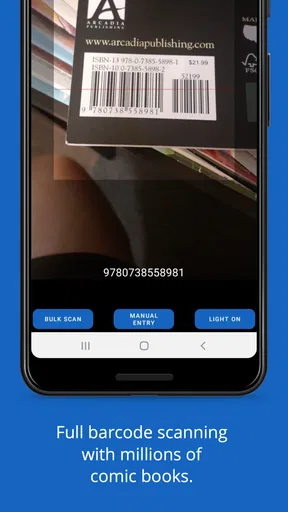
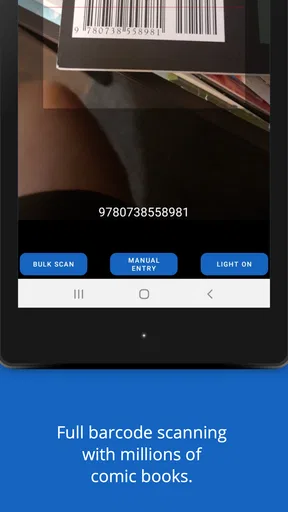
Before scanning a large shelf, I’d agree on a simple entry routine: record the issue, use the notes for ownership or condition reminders, and add wanted titles to the wishlist rather than leaving them in a separate message thread. Barcode scanning can speed up cataloging when an issue has a barcode, while manual entry gives collectors a way to handle older or unusual books. The trade-off is that manual records take more attention, so it is worth checking entries as you go instead of leaving a long cleanup session for later.
The app is free to start, with in-app purchases listed from $29.99 to $79.99 per item. I’d begin by testing the cataloging routine on a small section of the shelf before deciding whether a paid option suits the household’s needs. The app is developed by iCollect Everything, LLC, and its current version is 9.0.5. Since several people may use one device, I would also decide whose device and account will hold the main catalog; a shared screen is not the same thing as separate household profiles, so I wouldn’t assume individual access boundaries without checking the app’s current settings.
Coordinate Without Losing the Personal Details
Sharing a collection with friends can make it easier to show what you own and talk about comics, but I’d treat sharing as a choice rather than a default. A household may want to show a public-facing collection while keeping personal notes—such as where an issue came from—private or simply limited to the people who need them. Before sharing, review what the record contains and keep sensitive details out of notes intended for other viewers. This is useful not only for privacy, but also for avoiding confusion when a borrowed book or a planned gift appears in the catalog.
For a family shopping trip, I’d use the wishlist as the quick reference and leave the full collection for checking at home. That keeps the task focused: compare a candidate issue against what is already recorded, then decide whether it belongs on the purchase list. If two collectors maintain the catalog, agreeing on who adds new acquisitions prevents inconsistent titles and duplicate entries. The app can support that coordination, but it cannot replace a shared understanding about who updates records or how borrowed comics are marked.
Age, Trust, and Who Should Use It
The content rating is Everyone, which makes the app broadly suitable as a cataloging tool for households with younger comic fans. I would still have an adult oversee purchases and decide what collection details are shared. The age rating describes the app’s content, not every comic a family might catalog, and it does not establish parental controls or separate child accounts. Younger users can help scan and organize, while an adult can manage purchase decisions and any account or sharing choices.
With an average rating of 4.1 from around 266 ratings, the app has found an audience among collectors, though that figure alone cannot tell me whether its workflow fits a particular family. It has over 10,000 installs. I’d recommend trying it if you have enough books that memory and handwritten lists are becoming unreliable, especially if you often shop for specific issues. If you only own a handful of comics, a basic note or spreadsheet may be quicker and easier to maintain.
Where It Fits Among Collection Tools
Compared with a notebook, the barcode scanning and structured fields can make adding and sorting entries less laborious. Compared with a general spreadsheet, the dedicated comic-collection focus is more natural for tracking issues and building a wishlist. But a spreadsheet can be easier when several household members need custom columns for ownership, lending, or purchase plans, and it may suit people who want full control over their layout. I’d choose this app for convenience and a comic-oriented workflow; I’d choose a flexible document if household rules matter more than scanning and a ready-made catalog.
There are practical limits to consider. Scanning helps only when an issue can be identified that way, and a collector with many older books should expect some manual work. A catalog is only as dependable as its entries, so rushed scanning or inconsistent notes can create false confidence at the shop. For valuable or personally important comics, I’d keep the physical collection organized too and use notes to clarify details that matter, rather than assuming the digital record answers every question.
My First Impressions and Cataloging Workflow
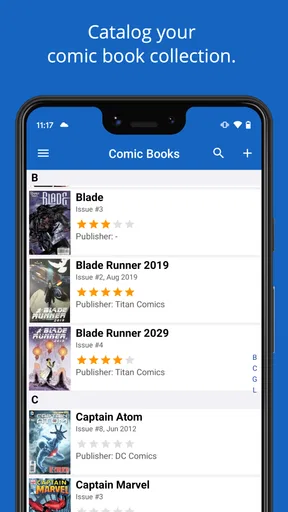
Upon opening iCollect Comic Books, you’re greeted with an intuitive and colorful interface. It’s like stepping into a comic book store, with vibrant visuals that make navigation feel like a breeze. The app makes it super easy to start cataloging your comics right from the get-go.
Organizing Your Collection
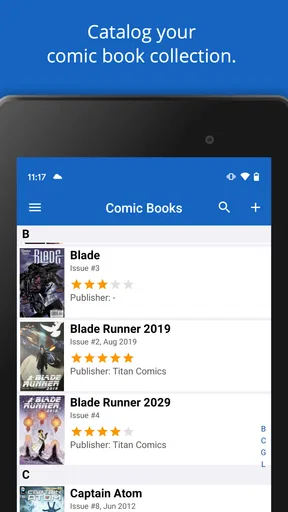
One of the standout features is its robust cataloging system. You can quickly add comics by scanning barcodes, which is a game-changer for those with large collections. No more manually entering each title — just a quick scan and you're set! Plus, there’s an option to add comics manually if you have rare or older issues without barcodes.
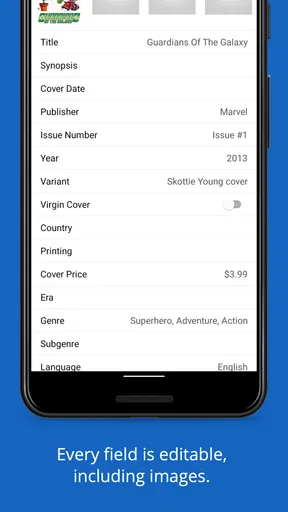
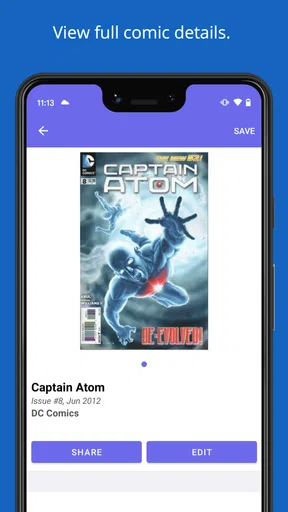
The app allows you to categorize comics by series, publisher, and even writer, which is fantastic for fans who follow specific creators. You can also add personal notes to each entry, making it easy to jot down where you bought it or any memorable stories attached to specific issues.
Keeping a Useful Wishlist
If you’re like me and always on the hunt for the next great find, the wishlist feature is your new best friend. You can easily add comics you’re itching to own, and the app will keep track of them. This is perfect for conventions or when visiting your local comic shop — no more scribbled lists or trying to remember off the top of your head.
Sharing and Community
Another cool aspect is the ability to share your collection with friends. You can show off your prized issues or even get recommendations. It’s like having a little comic book club in your pocket! The app also connects you to a community of fellow collectors, which is a great way to discover new series or trade duplicates.
Customization and Everyday Use
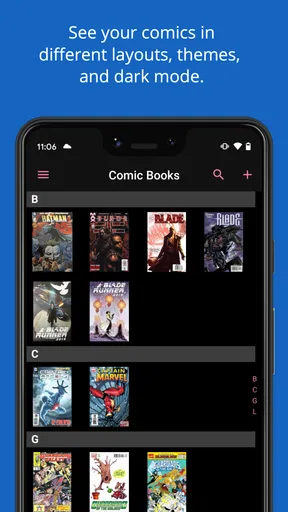
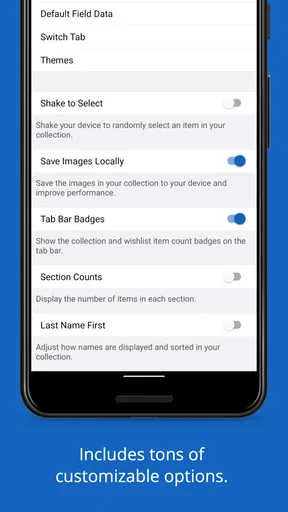
One thing I absolutely love is how customizable the app is. You can tweak layouts and adjust settings to suit your preferences. This personal touch makes the app feel like it’s truly yours, enhancing the overall user experience.
Performance and Platform Fit
On the performance front, the app runs smoothly with minimal lag. It’s compatible with both Android and iOS, and I found that it syncs seamlessly across devices, which is perfect for multi-platform users. The developers also seem committed to regular updates, constantly improving the app’s functionality.
The release date is September 20, 2021, and the minimum operating-system requirement is version 11. I’d check that requirement before planning to use an older device as the household’s scanning station. The app is free to download, but the available in-app purchases mean it is sensible to explore the basic workflow first rather than assuming every feature is included at no cost.
Who I’d Recommend It To
For a dedicated collector, the strongest reason to try it is the combination of scanning, searchable organization, and a wishlist in one place. It is also a good fit for a household that wants a shared reference for shopping, provided everyone agrees how to record ownership and who maintains the catalog. Someone who prefers a private, highly customized inventory—or who wants to manage comics alongside unrelated belongings—may be happier with a spreadsheet or a broader collection tracker.
After spending some quality time with the app, I’d say it’s a must-have for any comic book enthusiast. It combines practicality with a fun, user-friendly experience. While there might be a slight learning curve for those new to digital cataloging, the benefits far outweigh any initial hurdles.
To sum it up, whether you're organizing a massive collection or just keeping track of a few favorite issues, it’s a useful tool for keeping comic records close at hand. I’d start with a small batch, decide how notes and wishlists will be used, and expand only if the routine proves helpful. For collectors who enjoy seeing their shelves represented in an organized catalog, that approach makes the app worth a try; for a small or loosely tracked collection, a simpler list may be all you need.
Verdict
Strengths of iCollect Comic Books
- User-friendly interface for easy navigation.
- Comprehensive database with rare finds.
- Barcode scanner speeds up cataloging.
- Customizable lists for personal organization.
- Offline access for convenience.
Limitations of iCollect Comic Books
- Limited free features without subscription.
- Occasional syncing issues reported.
- Barcode scanner needs optimal lighting.
- Some data entries may be outdated.
- Subscription cost may deter casual users.
Similar Picks in This Category
View All
WEBTOON: Manga, Comics, Manhwa
NAVER WEBTOON4.6

MangaToon: Comic & Manga
MangaToon4.3

네이버 웹툰 - Naver Webtoon
NAVER WEBTOON4.3

Tapas – Comics and Novels
Tapas Entertainment Inc.4.2

Lezhin Comics - Daily Releases
LEZHIN ENTERTAINMENT3.3

WebComics - Webtoon & Manga
WEBCOMICS HOLDINGS HK LIMITED4.4
Frequently Asked Questions
What is iCollect Comic Books and what can it do?
iCollect Comic Books is a comprehensive app designed for comic book enthusiasts to catalog their collections. It allows users to scan barcodes, add comics manually, and track issues with ease. The app includes features like price tracking, wishlist management, and detailed information on each comic, making it a must-have for collectors.
Is iCollect Comic Books available for both Android and iOS?
Yes, iCollect Comic Books is available for both Android and iOS platforms. Users can download it from Google Play Store for Android devices and the App Store for iOS devices. Ensure your device meets the app's compatibility requirements before downloading.
Does iCollect Comic Books offer cloud synchronization?
Yes, iCollect Comic Books offers cloud synchronization, which allows users to back up their collection and sync data across multiple devices. This feature ensures that your catalog is safe and accessible from anywhere, providing peace of mind to collectors who want to safeguard their data.
Are there any in-app purchases or subscriptions in iCollect Comic Books?
iCollect Comic Books offers a free version with basic features, but to unlock premium features like unlimited cloud storage and advanced management tools, users may need to make in-app purchases or subscribe to a premium plan. Check the app for detailed pricing information.
How user-friendly is iCollect Comic Books for new users?
iCollect Comic Books is designed with user-friendliness in mind, featuring an intuitive interface that guides new users through setup and cataloging. The app includes tutorials and a help section to assist users in navigating its various features, making it accessible even to those new to digital cataloging.
